
Every time I take the high-speed rail to rush a case, the thing I fear most is network disconnection or cloud service outage, and the AI model at hand directly “gets stuck”. For developers, content creators, or data scientists, uploading sensitive data to the cloud always has security concerns, but if the local performance isn’t enough, you can’t run large models. This dilemma really drives people crazy. If you’re also looking for a work machine that can “process AI offline, with performance not inferior to MacBook Pro”, this Surface Laptop Ultra might be the answer you’re looking for.

Why is CUDA the key to this showdown?
Most laptops on the market tie their AI features to the cloud, but the Surface Laptop Ultra comes with an NVIDIA RTX graphics chip that fully supports CUDA. What does that mean? You can run AI models with 70B or even 120B parameters directly on the laptop without any internet connection. For professionals who need to handle confidential contracts, private codebases, or strictly comply with NDAs, this isn’t just convenient—it’s “necessary”.
Paired with up to 128GB of unified memory, it becomes one of the few Windows laptops that can smoothly train large AI models in an offline state. However, if your AI workflow truly requires CUDA acceleration, don’t go for the entry-level 24GB model—memory will run out quickly.
Daily Use: The Battle of Balancing Performance, Thermals, and Battery
Setting AI aside, most people’s daily work doesn’t really involve AI. Compiling code, opening 40 browser tabs, editing videos while replying to emails… these are the real “skills” of a laptop.
The Surface Laptop Ultra features a 15-inch touchscreen with HDR peak brightness up to 2,000 nits (though only in 10% zones), which is quite spacious for timeline editing or multi-window work. The ports are also very thoughtful: three USB-C, one traditional USB-A, plus HDMI and an SD card reader—you don’t need to buy any adapters when going out. Charging uses a built-in magnetic USB-C design that snaps on and charges intuitively.
For battery life, Microsoft claims “all-day use,” but real-world numbers aren’t as clear-cut as the MacBook Pro’s 14 hours. If you often need to work away from an outlet for long periods, you might need to carry the charger with you.
Who is it for? Key advantages at a glance
- ✅ Offline AI Computing: Full CUDA support, run large language models locally without data leakage
- ✅ Ultra-Large Memory Options: Up to 128GB, easily load models with billions of parameters
- ✅ 15-inch Large Touchscreen: Ideal for editing and multitasking, wider field of view
- ✅ Rich Ports: Built-in USB-A, HDMI, SD card slot, reducing adapter dependency
- ✅ Great for Gaming and Entertainment: Supports DLSS and Reflex technologies, smooth mainstream gaming on 120Hz screen
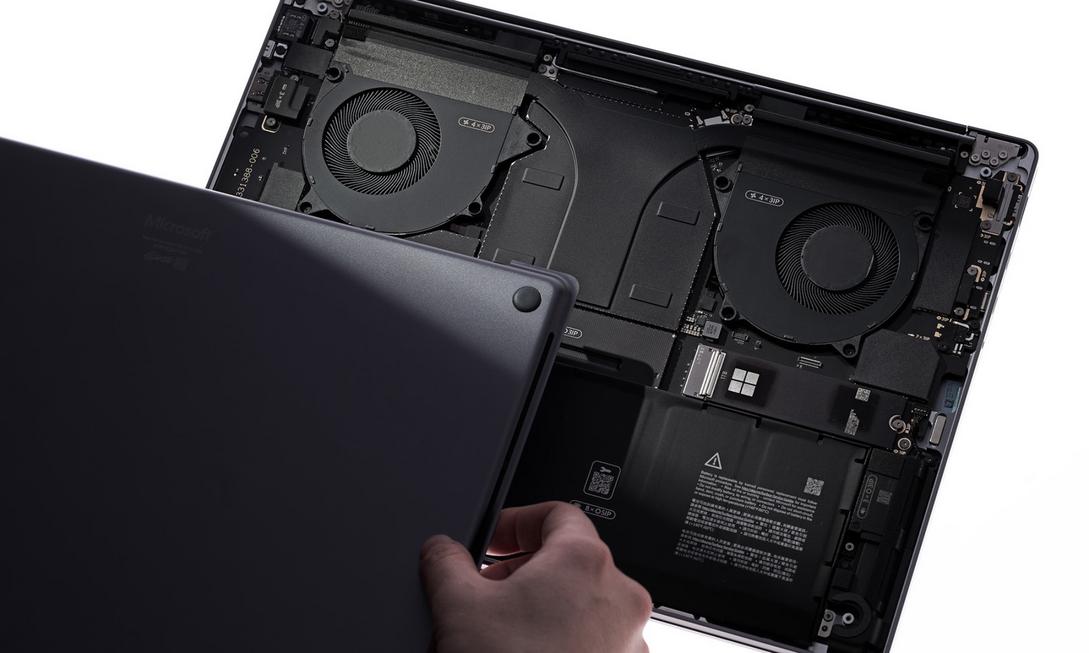
- ✅ Repairable Design: SSD can be replaced by users, parts can be ordered directly, extending product lifespan
Conclusion: A Laptop Born for “Professional Needs”
The Surface Laptop Ultra isn’t a jack-of-all-trades “do a bit of everything” machine, but a professional tool tailored for a specific group. If you’re a developer who needs to run AI models locally, a contract engineer who prioritizes data security, or a creator who edits during the day and games at night, it definitely deserves a spot on your list.
Although pre-orders are currently open and independent reviews haven’t been widely released yet, based on the existing specs and CUDA ecosystem advantages, this laptop has already secured a key position in the AI laptop battlefield. If you’re tired of waiting for cloud responses and fed up with data leakage risks, now is the best time to switch to the Surface Laptop Ultra.
